LangChain with MCP: Connect Models to Tools via Model Context Protocol
A practical LangChain + MCP guide — discover MCP servers, bind tools to chains and agents, handle auth and errors, and ship enterprise copilots without rewriting every integration.
- LangChain
- MCP
- AI Agents
- Enterprise AI
- Tool Calling
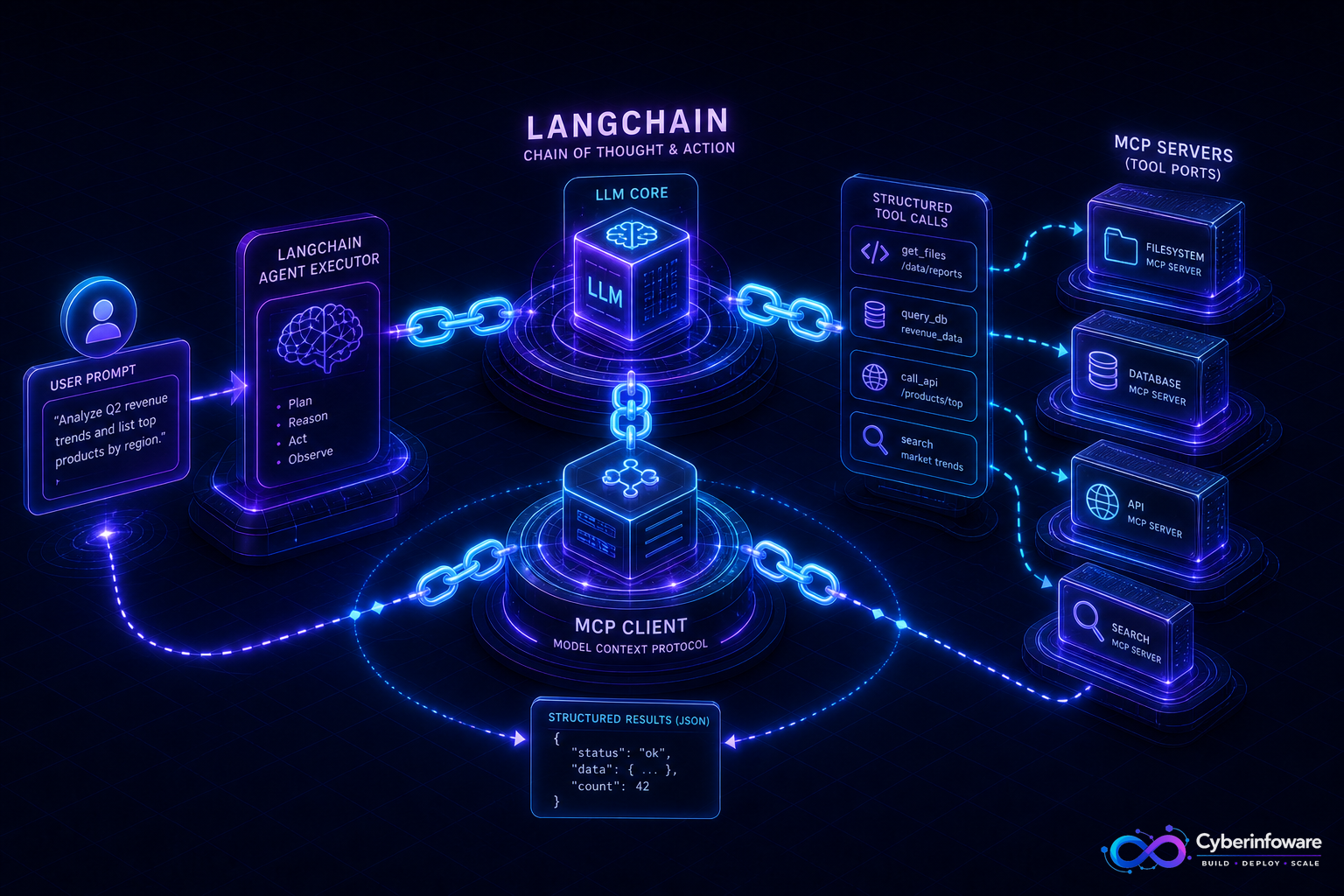
LangChain gives you chains, agents, and structured tool calling. MCP (Model Context Protocol) gives you a standard way to expose those tools from separate processes — databases, internal APIs, docs, ticketing — without hard-coding every integration into your app. Together they mean one LangChain agent can discover and call MCP servers the same way Cursor and other hosts do, while you keep credentials and business logic on the server side.
This guide focuses on the LangChain + MCP integration layer — not LangGraph orchestration (covered elsewhere) and not NestJS wrappers (also covered elsewhere). You will see how tools flow from MCP into LangChain, what to configure first, and how Cyber Infoware teams ship this in enterprise copilots and SaaS backends.
Why LangChain still needs MCP
- Hand-written LangChain `@tool` functions do not scale across teams and repos
- Each new data source becomes custom Python glue and duplicate auth
- MCP servers publish typed tools once; any LangChain client can consume them
- Tool updates deploy independently of the agent container
End-to-end flow: prompt → LangChain → MCP → result
- Start MCP servers — e.g. Postgres read-only, internal REST API, knowledge search (stdio or SSE transport)
- LangChain MCP client — connect to one or many servers; list available tools and JSON schemas
- Adapt tools — MCP tool definitions become LangChain `StructuredTool` (or equivalent) the model can call
- Chain or agent — ReAct / tool-calling agent selects a tool; LangChain invokes the MCP client
- MCP server executes — validates args, applies auth, returns structured JSON (size-capped)
- Model continues — uses tool output in the next turn until it answers or hits a step budget
Multi-server setup (typical enterprise)
- `mcp-server-docs` — search runbooks and product docs
- `mcp-server-crm` — read-only account and ticket lookup
- `mcp-server-ops` — create ticket (write; stricter auth)
- LangChain agent allowlist includes only the tools you register — not every tool on every server by default
LangChain patterns that work with MCP
- Tool-calling chat — simplest: bind MCP tools to a chat model with `bind_tools` / agent executor
- RAG + MCP — retrieval for static knowledge; MCP for live systems (inventory, billing status)
- Structured output — Pydantic parsers on the final answer; MCP handles facts, LangChain handles shape
- Callbacks / tracing — log each MCP invocation (tool name, latency, success) for support and evals
MCP is the USB port; LangChain is the app that decides when to plug something in. Neither replaces the other.
Configuration checklist
- Pass user or service identity into MCP (env, headers, or server-side session) — do not embed secrets in prompts
- Set timeouts and max retries on MCP calls; models retry aggressively
- Truncate or summarize large MCP responses before feeding back to the model
- Version tool schemas; breaking renames break LangChain tool bindings silently in subtle ways
- Run MCP servers as separate processes/containers with least-privilege credentials
- Eval with golden questions: "What is tenant X MRR?" must hit the billing MCP tool, not guess
LangChain vs LangGraph (where MCP fits)
- LangChain + MCP — great for copilots, support bots, and linear tool-calling flows
- LangGraph + MCP — add when you need checkpoints, human approval, or multi-agent routing
- Start LangChain + MCP; graduate to LangGraph when loops and state become non-negotiable
Common mistakes
- Exposing a generic HTTP tool instead of narrow MCP tools — models invent URLs
- Returning 10k-row query results into context — summarize server-side
- Sharing one MCP server for read and destructive write without separate auth
- Skipping idempotency on write tools when the agent retries
What "done" looks like
A LangChain agent answers from live MCP tools, each call is logged, credentials never sit in the prompt, and adding a new data source means deploying an MCP server — not redeploying the whole agent. Explore Cyber Infoware products or contact us for LangChain, MCP, and agent architecture on your stack.
Explore Cyber Infoware packages
Production NestJS SaaS foundations with commercial licensing — pick the architecture that matches your team.
- NestJS Microservice Starter Kit
Production NestJS microservices — API gateway, Keycloak SSO, RabbitMQ, Docker, Kubernetes, and Terraform.
- Enterprise SaaS Microservices Boilerplate
Full multi-tenant SaaS control plane as NestJS microservices — service-per-DB, billing, audit, notifications.
- Multi-Tenant SaaS Boilerplate
Best-seller NestJS multi-tenant SaaS boilerplate — one API, per-tenant databases, billing, and Keycloak SSO.