ETL End to End: Extract, Transform, Load with Example Source & Destination Databases
A practical ETL walkthrough — extract from OLTP and APIs, transform with cleaning and joins, load into an analytics warehouse. Includes example source databases (PostgreSQL, MySQL) and a destination star-schema warehouse.
- ETL
- Data Engineering
- PostgreSQL
- Analytics
- SaaS
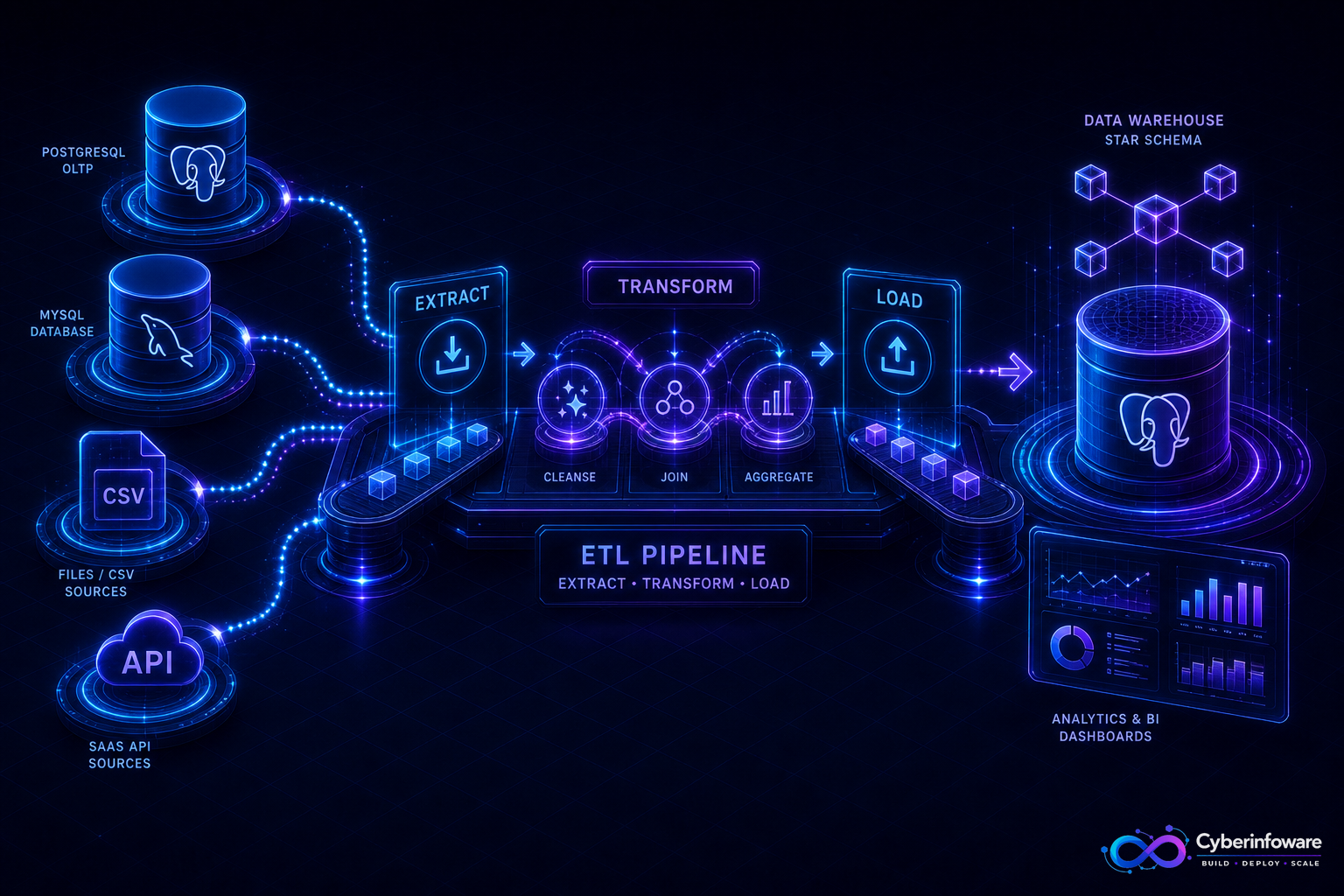
ETL (Extract, Transform, Load) moves data from systems built for transactions into systems built for analysis. Your NestJS SaaS writes orders into an OLTP PostgreSQL database all day; your CFO needs revenue by plan, tenant, and region in a warehouse that will not slow production. ETL is the disciplined path between those worlds.
This guide walks the full process with concrete example databases: operational sources, the transforms you run in between, and a destination analytics schema — plus how Cyber Infoware SaaS kits become reliable sources for reporting pipelines.
What ETL solves (and what it is not)
- Extract — pull rows (or events) from sources without locking production for hours
- Transform — clean, type-cast, dedupe, join, and reshape for analytics
- Load — write into a destination warehouse optimized for queries, not for 1ms API writes
- ETL is not a backup; it is not real-time CDC by default (though pipelines often evolve that way)
Example architecture: SaaS orders → analytics warehouse
Imagine a multi-tenant SaaS. Sources hold live product data. The destination holds reporting tables. A nightly (or hourly) job extracts increments, transforms them, and loads the warehouse.
Example source databases
- Source A — PostgreSQL OLTP (`saas_app`) — NestJS primary DB: `tenants`, `users`, `subscriptions`, `invoices`, `invoice_lines`
- Source B — MySQL (`legacy_crm`) — older CRM still holding `accounts` and `opportunities` (common during migrations)
- Source C — API / files — Stripe (or Razorpay) settlement exports; CSV of marketing spend for cost attribution
Minimal source shapes (simplified):
- `saas_app.invoices(id, tenant_id, status, currency, total_cents, issued_at, updated_at)`
- `saas_app.subscriptions(id, tenant_id, plan_code, status, mrr_cents, started_at)`
- `legacy_crm.accounts(id, external_tenant_key, segment, owner_email)`
Example destination database
- Destination — PostgreSQL warehouse (`analytics_wh`) — separate instance/database; never the same connection pool as production APIs
- Dimensions — `dim_tenant`, `dim_plan`, `dim_date`
- Facts — `fact_invoice`, `fact_subscription_daily` (MRR snapshots)
- `dim_tenant(tenant_sk, tenant_nk, name, segment, valid_from, valid_to)`
- `fact_invoice(invoice_sk, tenant_sk, invoice_nk, status, amount_usd, issued_date_sk, loaded_at)`
End-to-end process step by step
- Discover & contract — document source tables, primary keys, update columns (`updated_at`), and PII rules
- Extract — full load once; then incremental by watermark (`WHERE updated_at > :last_success`)
- Stage — land raw extracts in `staging.*` tables (or S3/Parquet) unchanged for replay
- Transform — cast types, map currencies to USD, join CRM segment onto tenants, soft-delete filters
- Surrogate keys — map natural keys (`tenant_id`) to warehouse keys (`tenant_sk`)
- Load — upsert dimensions; append or merge facts; record `pipeline_run_id` and row counts
- Validate — reconcile source invoice totals vs warehouse facts within a tolerance
- Publish — grant BI roles read-only access; never let dashboards hit OLTP
Transform examples that matter
- Cleaning — trim emails, normalize country codes, drop test tenants (`tenant_id` in denylist)
- Deduping — keep latest invoice version by `(invoice_id, updated_at)`
- Currency — convert `total_cents` + `currency` → `amount_usd` with a dated FX table
- Slowly changing dimensions — when tenant segment changes, close the old `dim_tenant` row and open a new one
- Late arrivals — reprocess a lookback window (e.g. 7 days) so delayed Stripe events still land
If your warehouse and production share one database "to save cost," you do not have analytics — you have a future outage disguised as a dashboard.
Load strategies for the destination
- Full refresh — small dims or daily snapshot tables; truncate + reload
- Incremental merge — upsert facts on natural key; update changed measures
- Insert-only — immutable event facts; corrections as new rows with version
- Always isolate loads in a transaction or swap via staging→prod table rename for big batches
Operations checklist
- Idempotent runs — re-running yesterday's job must not double-count revenue
- Watermark table — `etl_watermark(source, high_water_ts, run_id)`
- Alert on row-count drops, null spikes, and reconcile failures
- PII — hash or exclude emails unless the warehouse is approved for that data
- Schedule during low OLTP load; use read replicas for extract when possible
- Version transform SQL/code the same way you version NestJS services
What "done" looks like
Finance opens a dashboard on `analytics_wh`, numbers match source invoices within tolerance, a failed run alerts before the standup, and production APIs never serve BI scans. Explore Cyber Infoware products or contact us for SaaS platforms and data pipelines that keep transactional and analytical databases in their lanes.
Explore Cyber Infoware packages
Production NestJS SaaS foundations with commercial licensing — pick the architecture that matches your team.
- NestJS Microservice Starter Kit
Production NestJS microservices — API gateway, Keycloak SSO, RabbitMQ, Docker, Kubernetes, and Terraform.
- Enterprise SaaS Microservices Boilerplate
Full multi-tenant SaaS control plane as NestJS microservices — service-per-DB, billing, audit, notifications.
- Multi-Tenant SaaS Boilerplate
Best-seller NestJS multi-tenant SaaS boilerplate — one API, per-tenant databases, billing, and Keycloak SSO.