Audit Logs & Soft Deletes in NestJS Multi-Tenant SaaS: Who Changed What, Without Losing History
A practical NestJS guide to soft deletes and audit logging for multi-tenant SaaS — deleted_at patterns, immutable audit trails, tenant isolation, and compliance-ready history without silent data loss.
- NestJS
- Audit Logs
- Soft Delete
- SaaS
- Compliance
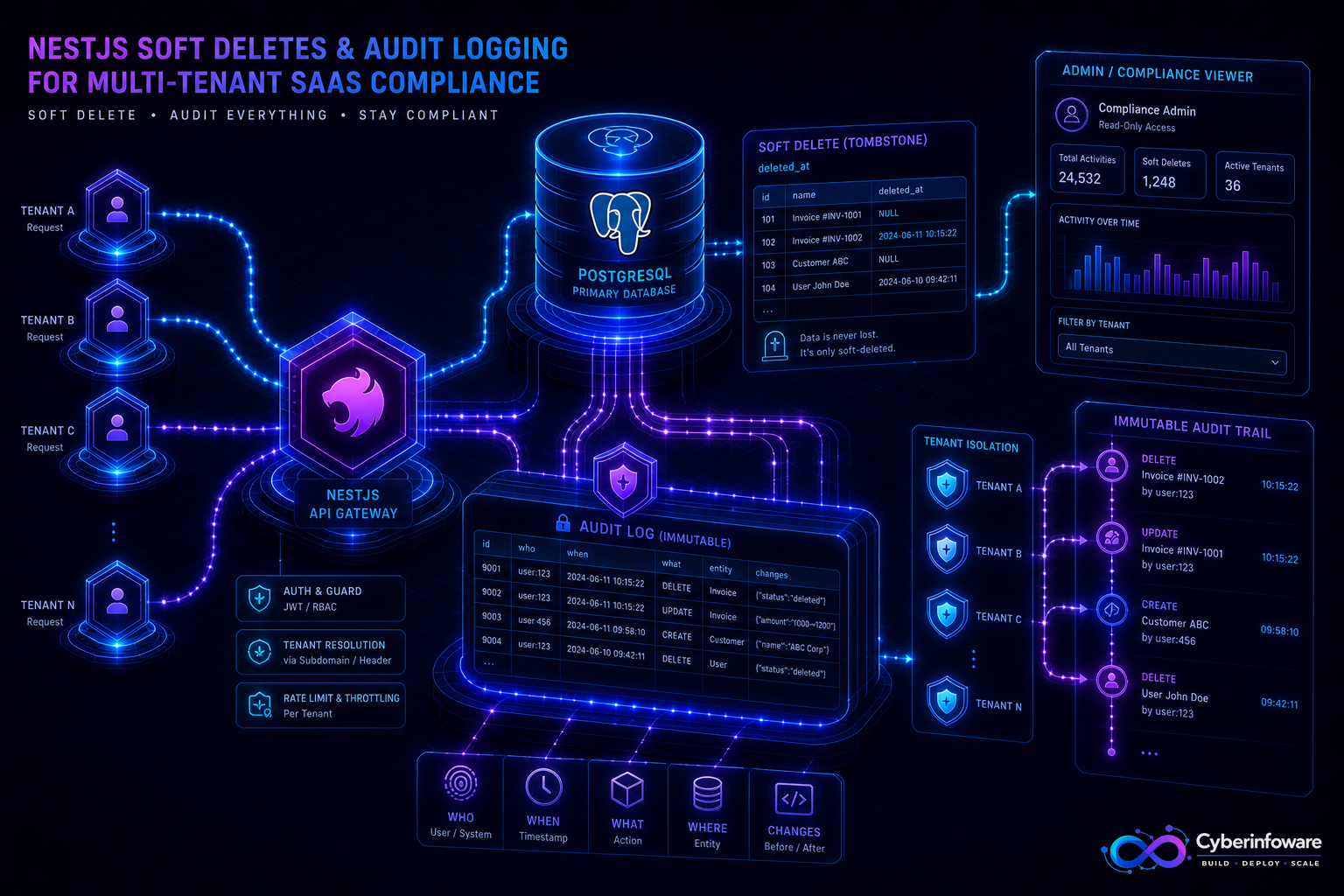
Hard deletes erase evidence. In multi-tenant NestJS SaaS, customers, auditors, and your own support team need to answer *who changed what, when, and under which tenant* — even after a record "disappears" from the UI. Soft deletes (`deleted_at`) keep business rows recoverable; an immutable audit log records the story behind every create, update, permission change, and billing action.
This guide covers when soft delete is enough, when you need a separate audit stream, how to keep trails tenant-safe, and how Cyber Infoware kits ship NestJS services with the data and auth boundaries those patterns need.
Why "just delete the row" fails SaaS buyers
- Support cannot restore an accidentally removed project, member, or invoice line
- Security reviews ask for access and change history — empty tables are not an answer
- Billing disputes need proof of plan changes and actor identity
- Hard deletes break foreign keys and analytics that still need historical facts
Soft delete vs audit log — use both on purpose
- Soft delete — mark `deleted_at` (and often `deleted_by`) so default queries exclude the row but restore remains possible
- Audit log — append-only events: actor, tenant, action, entity type/id, before/after (or diff), request id, timestamp
- Soft delete answers "is this still active?"; audit answers "what happened over time?"
- Never treat application logs as your audit store — they rotate, lack structure, and are hard to prove intact
What to audit first in NestJS
- Authz changes — roles, invites, API keys, SSO mappings
- Billing and entitlements — plan upgrades, seats, feature packs
- Destructive admin actions — delete project, purge member, export data
- Tenant lifecycle — create, suspend, reactivate, offboard
- Sensitive config — webhook secrets rotation (store metadata, never raw secrets)
A production checklist
- Default repositories/filters exclude soft-deleted rows; expose explicit `withDeleted` only to privileged paths
- Write audit events in the same transaction as the business change when consistency matters
- Make the audit table append-only — no update/delete from app roles; use a separate retention job if required
- Include tenant id on every event; enforce it in queries so one tenant never reads another's trail
- Redact secrets and PII from stored diffs; keep enough detail to explain the change
- Index by tenant + time + entity for support and compliance queries
If you cannot reconstruct who deleted a tenant admin last Tuesday, you do not have an audit trail — you have hope and application logs.
Multi-tenant pitfalls
- Global unique constraints must account for soft-deleted rows (partial unique indexes on `deleted_at IS NULL`)
- Background jobs must respect soft delete — or they will "revive" work on tombstoned entities
- Per-tenant databases still need an audit strategy per DB plus a control-plane trail for routing changes
- Retention policies are a product decision: restore window vs storage vs legal hold
What "done" looks like
A mistaken delete is restorable, every privileged change has an actor and timestamp, and support can answer compliance questions from the product — not from grepping servers. Explore packages on cyberinfoware.com/products or contact us to match a kit to your audit and data-retention goals.
Explore Cyber Infoware packages
Production NestJS SaaS foundations with commercial licensing — pick the architecture that matches your team.
- NestJS Microservice Starter Kit
Production NestJS microservices — API gateway, Keycloak SSO, RabbitMQ, Docker, Kubernetes, and Terraform.
- Enterprise SaaS Microservices Boilerplate
Full multi-tenant SaaS control plane as NestJS microservices — service-per-DB, billing, audit, notifications.
- Multi-Tenant SaaS Boilerplate
Best-seller NestJS multi-tenant SaaS boilerplate — one API, per-tenant databases, billing, and Keycloak SSO.