Background Jobs in NestJS with BullMQ & Redis: Queues That Survive Production
A practical guide to background jobs and queues in NestJS using BullMQ and Redis — emails, notifications, retries, delayed jobs, and workers. Learn what to offload first and how Cyber Infoware kits ship a job pipeline ready for SaaS scale.
- NestJS
- BullMQ
- Redis
- Queues
- Microservices
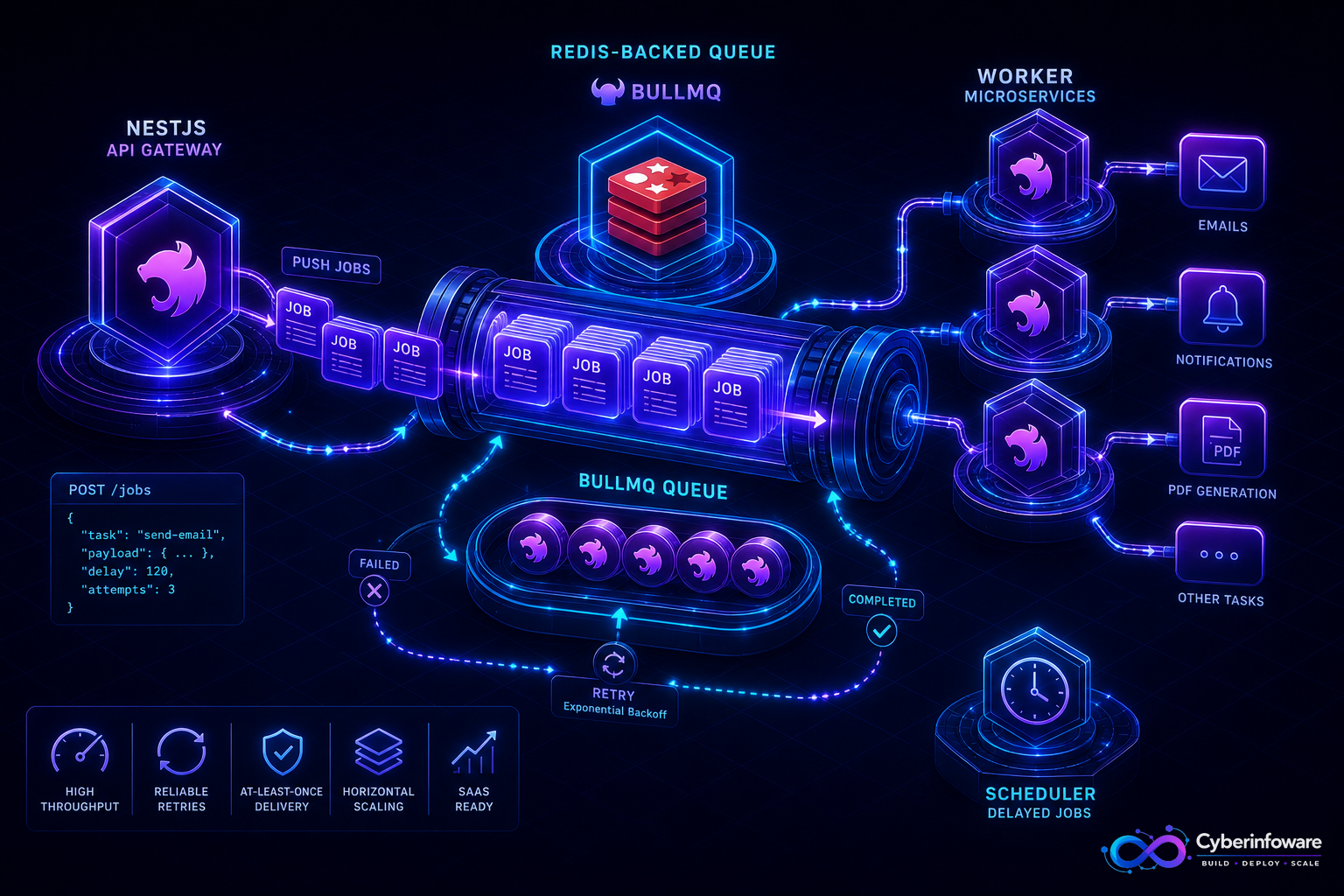
Background jobs are what keep a SaaS API fast. Sending a welcome email, generating an invoice PDF, syncing a webhook, or resizing an upload should never block the HTTP request that triggered it. In NestJS, BullMQ on top of Redis gives you a durable queue with retries, delays, and concurrency — so slow work happens off the request path and survives restarts.
This guide covers what to offload first, how a BullMQ producer/worker split looks in NestJS, and how Cyber Infoware kits ship a job pipeline so you are not wiring queues, retries, and dead-letter handling from a blank file.
Why inline work breaks under load
- A single signup that also sends email + provisions a tenant can take seconds — users feel every millisecond
- Third-party APIs (email, payments, storage) fail intermittently; inline calls turn their outage into yours
- Traffic spikes multiply slow requests until the event loop and DB connections starve
- Without a queue, a crash mid-request loses the work with no retry and no record
What to move to a queue first in NestJS
- Transactional email & notifications — welcome, receipts, password resets, digests
- Webhooks & integrations — outbound calls to Stripe/Razorpay, CRMs, Slack with retry on failure
- File & media work — PDF generation, image resizing, CSV exports/imports
- Scheduled & delayed jobs — trial-expiry reminders, nightly rollups, dunning emails
- Fan-out per tenant — provisioning, re-indexing, or cache warm-up after a plan change
Producer vs worker: the split that matters
- Producer — your API adds a job with a payload and options (attempts, backoff, delay), then returns immediately
- Worker — a separate NestJS process pulls jobs and does the slow work with controlled concurrency
- Run workers as their own deployable so you can scale them independently of the API
- Keep payloads small — pass IDs, not whole records — and let the worker re-load from the DB
A production checklist for BullMQ
- Set sensible `attempts` with exponential backoff so transient failures self-heal
- Make jobs idempotent — a retry must not double-charge or double-send
- Use a dead-letter path for jobs that exhaust retries; alert, don't silently drop
- Cap worker concurrency to protect the database and downstream APIs
- Remove completed jobs (or keep a bounded window) so Redis memory stays flat
- Add metrics and traces per queue so "why is email slow?" has an answer
If a job can run twice, it will. Idempotency is not a nice-to-have for queues — it is the contract.
SaaS-specific queue tips
- Tag jobs with tenant id so one noisy tenant cannot starve everyone else's work
- Separate high-priority (password reset) from bulk (nightly digest) using distinct queues
- Protect billing and webhook jobs with stricter retries and their own dashboards
- Pair BullMQ with Redis caching carefully — size memory for both jobs and cache, not one
What "done" looks like
Your API responds in milliseconds, emails and PDFs land reliably, a failed webhook retries itself, and a worker crash loses nothing because the queue holds the job. That is the reliability bar modern SaaS buyers assume. Explore packages on cyberinfoware.com/products or contact us to match a kit to your background-processing goals.
Explore Cyber Infoware packages
Production NestJS SaaS foundations with commercial licensing — pick the architecture that matches your team.
- NestJS Microservice Starter Kit
Production NestJS microservices — API gateway, Keycloak SSO, RabbitMQ, Docker, Kubernetes, and Terraform.
- Enterprise SaaS Microservices Boilerplate
Full multi-tenant SaaS control plane as NestJS microservices — service-per-DB, billing, audit, notifications.
- Multi-Tenant SaaS Boilerplate
Best-seller NestJS multi-tenant SaaS boilerplate — one API, per-tenant databases, billing, and Keycloak SSO.