Circuit Breakers in NestJS Microservices: Timeouts, Bulkheads & Failures That Stay Contained
A practical NestJS resilience guide for microservices — circuit breakers, timeouts, retries with jitter, bulkheads, and fallbacks. Learn how to stop one failing dependency from taking down your SaaS API.
- NestJS
- Resilience
- Circuit Breaker
- Microservices
- SaaS
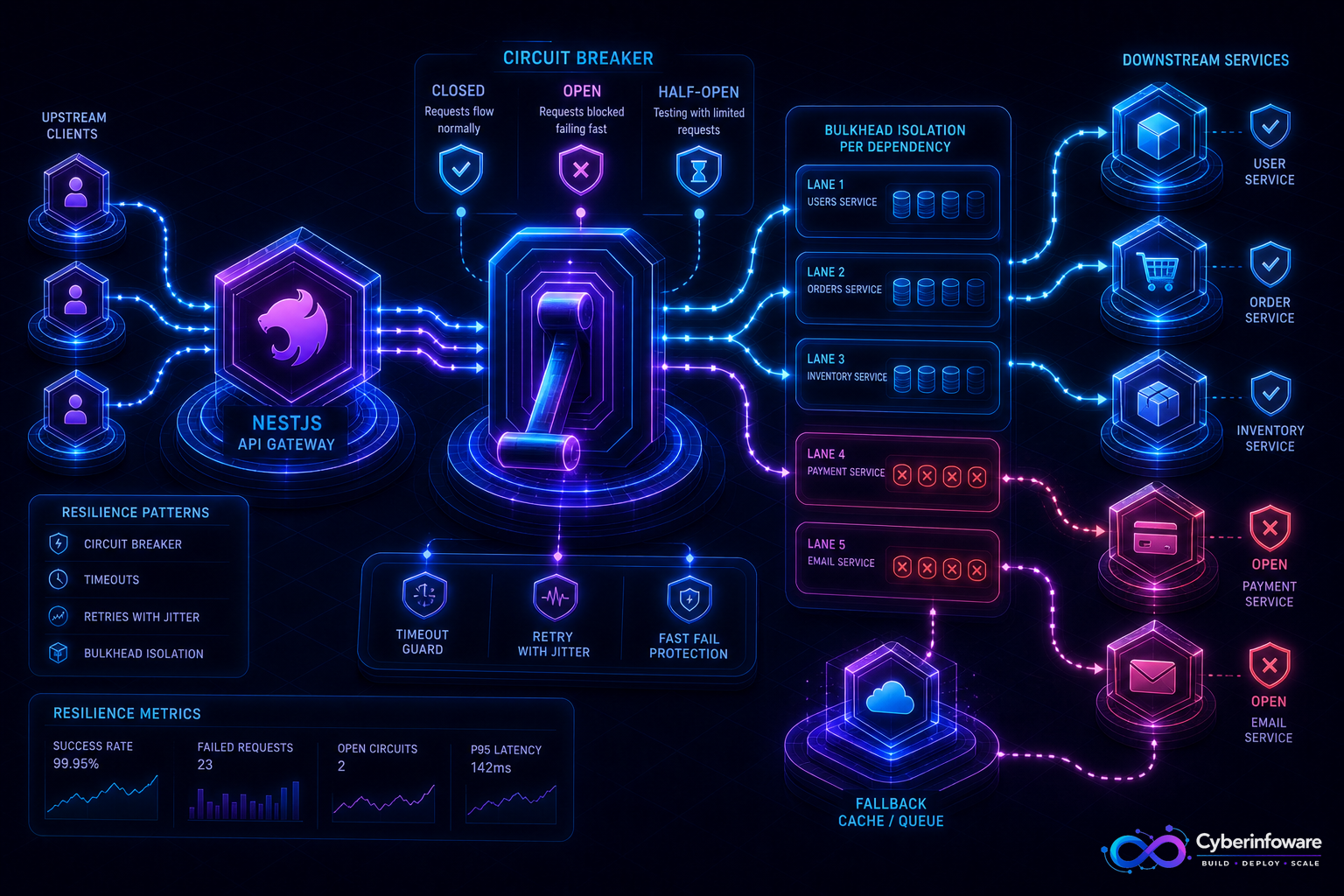
One slow dependency can freeze your entire NestJS API. When payments, email, or a downstream service hangs, threads pile up, queues back up, and healthy tenants feel the outage. Circuit breakers, timeouts, and bulkheads keep failures contained — so a broken integration trips open instead of cascading through every pod.
This guide covers what to wrap first in NestJS, how Closed / Open / Half-Open actually help, and how Cyber Infoware kits ship gateway + service boundaries where resilience policies have a natural home.
Why "just retry" makes outages worse
- Retries without backoff amplify load on an already failing dependency
- Missing timeouts turn a 30s upstream hang into exhausted connection pools
- A shared thread/worker pool lets one integration starve billing, auth, and core APIs
- Without a circuit, every request pays the full failure cost instead of failing fast
The resilience toolkit for NestJS
- Timeouts — every outbound HTTP/gRPC/DB call needs a budget; infinite wait is a latent outage
- Retries with jitter — only for idempotent or safely replayable operations
- Circuit breaker — stop calling a dependency after error/latency thresholds; fail fast while it recovers
- Bulkheads — isolate concurrency pools so email failures cannot consume payment workers
- Fallbacks — cached reads, degraded mode, or queue-for-later instead of a blank 500
Closed, Open, Half-Open — in plain terms
- Closed — normal traffic; failures are counted
- Open — calls short-circuit immediately; the dependency gets room to recover
- Half-Open — a small probe of traffic checks if recovery is real before fully closing again
- Tune on error rate and slow-call rate — not vanity success counts alone
What to protect first
- Payment and tax providers — high blast radius, strict SLAs
- Email/SMS gateways — noisy failures that should never block signup HTTP
- Partner webhooks and CRM sync — bursty and unreliable by nature
- Cross-service calls inside your own fleet — latency multiplies at the gateway
If every NestJS request waits forever on a dependency, you do not have microservices — you have a distributed single point of failure.
Production checklist
- Set explicit timeouts per dependency class (user-facing vs background)
- Never retry non-idempotent charges without an idempotency key
- Emit metrics for breaker state transitions, rejected calls, and fallback hits
- Alert when a breaker stays Open longer than your recovery SLO
- Test chaos: kill a dependency in staging and confirm the API degrades, not dies
- Document user-visible behavior in degraded mode (what still works)
SaaS-specific tips
- Prefer queueing tenant notifications over failing the whole request path
- Isolate noisy-tenant fan-out so one integration storm cannot open breakers for everyone
- Pair breakers with rate limits — both protect shared capacity from different angles
- Keep billing critical path thinner than marketing integrations
What "done" looks like
A payment provider blip opens a circuit, signups still succeed with delayed email, dashboards show Open → Half-Open → Closed, and core APIs stay responsive. That is resilience customers feel. Explore packages on cyberinfoware.com/products or contact us to match a kit to your reliability goals.
Explore Cyber Infoware packages
Production NestJS SaaS foundations with commercial licensing — pick the architecture that matches your team.
- NestJS Microservice Starter Kit
Production NestJS microservices — API gateway, Keycloak SSO, RabbitMQ, Docker, Kubernetes, and Terraform.
- Enterprise SaaS Microservices Boilerplate
Full multi-tenant SaaS control plane as NestJS microservices — service-per-DB, billing, audit, notifications.
- Multi-Tenant SaaS Boilerplate
Best-seller NestJS multi-tenant SaaS boilerplate — one API, per-tenant databases, billing, and Keycloak SSO.