Feature Flags in NestJS Multi-Tenant SaaS: Safe Rollouts, Per-Tenant Toggles & Kill Switches
A practical NestJS feature-flag guide for multi-tenant SaaS — per-tenant toggles, percentage rollouts, kill switches, and cache-safe evaluation. Learn what to flag first and how Cyber Infoware kits ship a production-ready platform edge.
- NestJS
- Feature Flags
- SaaS
- Multi-Tenant
- DevOps
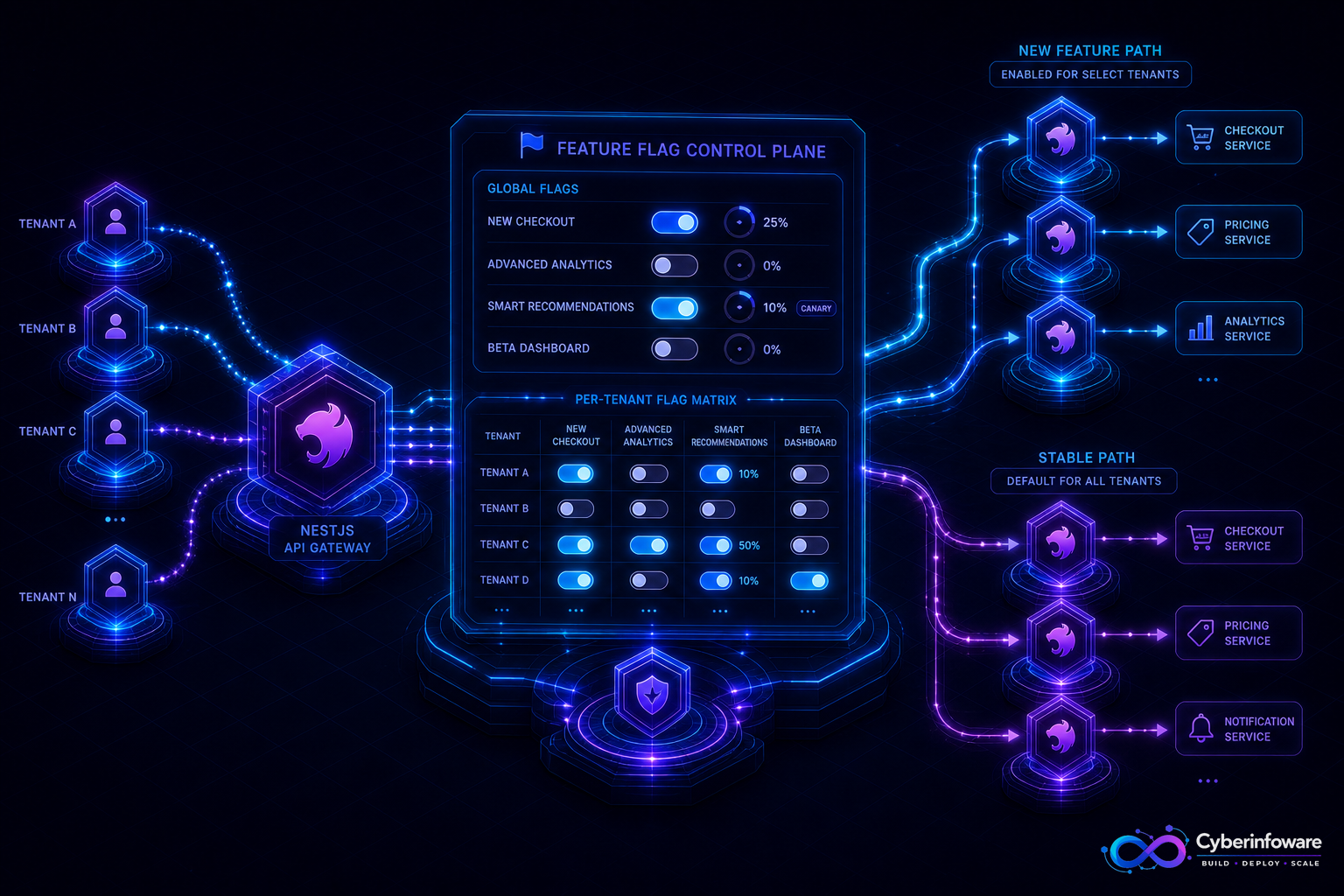
Feature flags let NestJS SaaS teams ship code dark and turn behavior on for one tenant, a canary cohort, or everyone — without a emergency redeploy. In multi-tenant products, flags are how you separate *release* from *exposure*: new billing UI for Tenant A, old path for everyone else, and a kill switch when something spikes errors.
This guide covers what to flag first, how per-tenant evaluation differs from global toggles, and how Cyber Infoware kits give you the gateway, Redis, and tenant context needed to evaluate flags safely in production.
Why big-bang releases break multi-tenant SaaS
- One bad feature hits every paying customer at once
- Enterprise tenants demand staged rollouts and contractual opt-ins
- Hotfixes that require a full rebuild are too slow when error rates climb
- A/B or plan-gated capabilities become hard-coded `if (plan === …)` debt without a flag layer
What to put behind a flag first
- Risky UX or API changes — new checkout, new permissions model, redesigned Admin screens
- Integrations — third-party billing, CRM sync, experimental webhooks
- Expensive work — new report queries, AI features, bulk export formats
- Kill switches — disable a noisy feature instantly without rolling back the whole release
- Plan entitlements — when a capability is sold as a tier, treat the flag as product config with audit
Global vs per-tenant vs percentage rollout
- Global — ops kill switch or platform-wide maintenance behavior
- Per-tenant — enterprise pilot, beta customer, or contractual feature pack
- Percentage / cohort — sticky hashing on tenant or user id so the same customer stays in the same bucket
- Combine rules — e.g. enabled for plan ≥ Growth AND 10% of remaining tenants
A production feature-flag checklist
- Default safe — unknown flags evaluate to off (or a documented safe default)
- Cache flag configs in Redis with short TTL; invalidate on change
- Keep evaluation in NestJS guards/interceptors or a dedicated FlagService — not scattered string compares
- Log flag decisions for support (tenant id + flag key + result) without logging secrets
- Version flag definitions; never rename a live flag without a migration window
- Remove stale flags after full rollout — flags are temporary debt unless they are product entitlements
A feature flag that cannot be turned off in under a minute is not a kill switch — it is documentation.
Multi-tenant pitfalls to avoid
- Do not evaluate flags before tenant resolution — you will leak or mis-route behavior
- Sticky rollouts need a stable hash seed; random Math.random() per request breaks UX
- Workers and cron jobs must see the same flag rules as the API, or jobs will diverge from UI
- Pair flags with metrics — error rate by flag state tells you when to kill or promote
What "done" looks like
You merge a NestJS change, enable it for one pilot tenant, watch metrics, expand the cohort, and keep a one-click kill switch ready — without a panic rollback of the whole release. That is how modern SaaS teams ship. Explore packages on cyberinfoware.com/products or contact us to match a kit to your rollout strategy.
Explore Cyber Infoware packages
Production NestJS SaaS foundations with commercial licensing — pick the architecture that matches your team.
- NestJS Microservice Starter Kit
Production NestJS microservices — API gateway, Keycloak SSO, RabbitMQ, Docker, Kubernetes, and Terraform.
- Enterprise SaaS Microservices Boilerplate
Full multi-tenant SaaS control plane as NestJS microservices — service-per-DB, billing, audit, notifications.
- Multi-Tenant SaaS Boilerplate
Best-seller NestJS multi-tenant SaaS boilerplate — one API, per-tenant databases, billing, and Keycloak SSO.