RBAC in NestJS Multi-Tenant SaaS: Roles, Permissions & Tenant Isolation That Actually Holds
A practical NestJS authorization guide for multi-tenant SaaS — RBAC vs permissions, tenant-scoped roles, guards, and isolation so SSO login is not treated as access. Learn what to enforce first and how Cyber Infoware kits ship a production-ready authz edge.
- NestJS
- RBAC
- Authorization
- SaaS
- Multi-Tenant
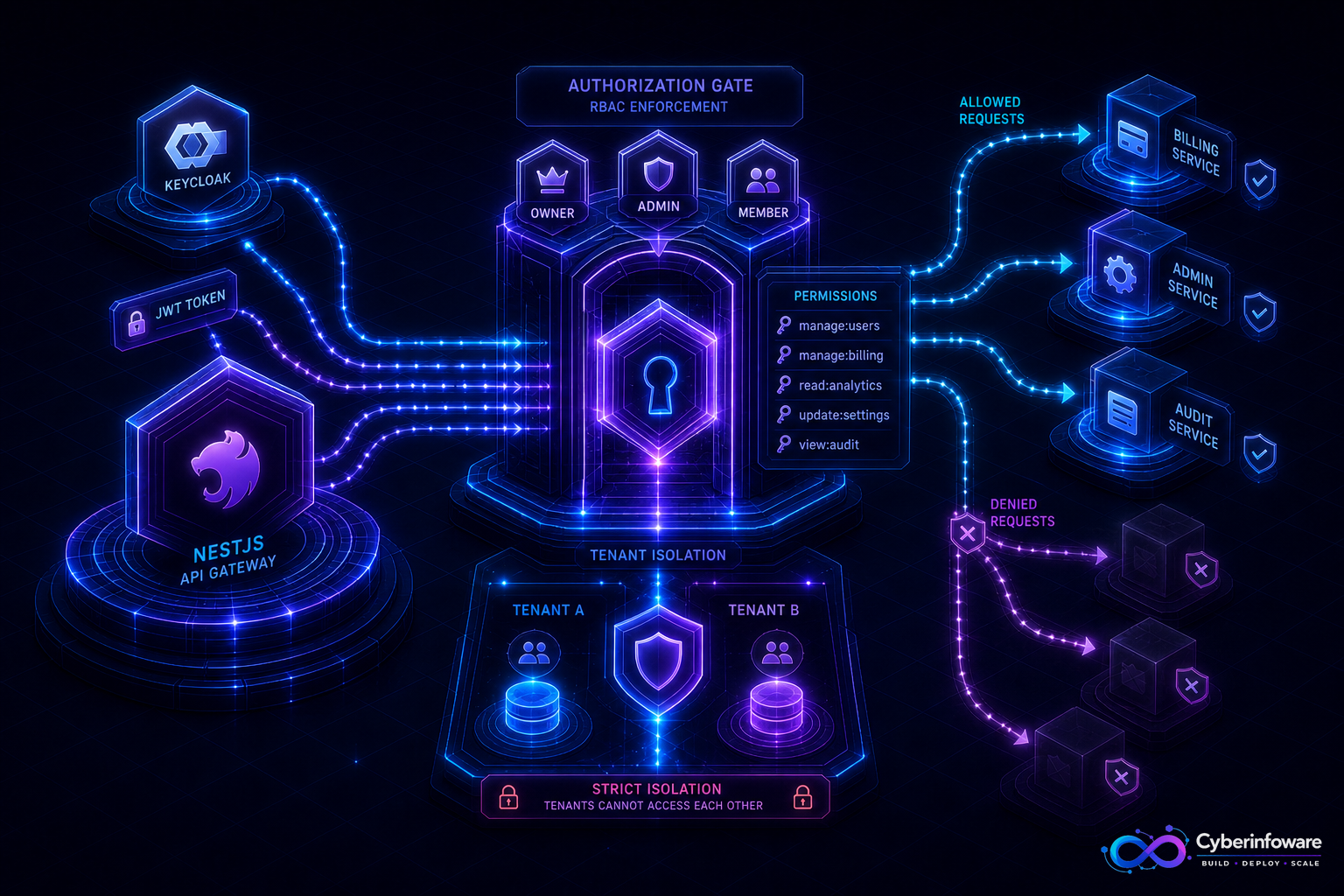
Authentication answers who you are. Authorization answers what you may do — in this tenant. A valid Keycloak/JWT session that can read another customer's billing or promote itself to owner is not a login bug. It is missing RBAC: tenant-scoped roles, permission checks in NestJS guards, and queries that never trust a client-supplied tenant id.
This guide covers a practical RBAC model for NestJS multi-tenant SaaS, what to enforce first, and how Cyber Infoware kits give you gateway + SSO + tenant context so authorization is a product layer — not a scatter of `if (role === 'admin')` checks.
Why "isAuthenticated" is not access control
- A member JWT that lists another tenant's resources is a data-leak waiting for one missed WHERE clause
- Global "admin" roles ignore that Tenant A admin must not manage Tenant B
- UI hiding a button does not stop a crafted API call
- Billing, invites, API keys, and audit exports need finer permissions than Owner / Member
A SaaS RBAC model that stays maintainable
- Tenant first — every privileged action runs inside a resolved tenant context from the token/session
- Roles — Owner, Admin, Member, Billing, Read-only (keep the set small)
- Permissions — `billing.read`, `members.invite`, `api_keys.rotate` — roles map to permission sets
- Guards / CASL / custom decorators — check permissions at the NestJS edge of each route
- Query isolation — repositories always filter by tenant id from context, not from the body
Roles vs permissions
- Roles are what you assign to people; permissions are what code checks
- Prefer checking permissions in guards so renaming a role does not rewrite every controller
- Enterprise customers will ask for custom roles later — permission catalogs make that possible
- Platform (super-admin) access must be a separate, audited path — never a tenant role with extra luck
What to lock down first
- Member invite / role change / owner transfer
- Billing, invoices, and plan changes
- API keys, webhooks, and secret rotation
- Audit log and data export endpoints
- Cross-tenant admin (your own operators) with extra MFA and audit
If a Member token can change another tenant's plan, you do not have multi-tenant RBAC — you have a login screen.
Production checklist
- Deny by default; missing permission is 403, not a silent skip
- Put tenant id in the JWT/session from IdP claims you control — not from query strings
- Test authorization with integration tests: same user, two tenants, expect isolation
- Audit every permission grant and role change (actor, tenant, before/after)
- Workers and cron jobs must impersonate a service principal with explicit scopes — not "run as admin"
- Cache permission sets briefly; invalidate on role change so revokes are fast
Multi-tenant pitfalls
- Do not share a global Admin role across tenants
- List endpoints leak if you authorize the route but not each row
- Soft-deleted members should lose permissions immediately
- Feature flags and plan entitlements compose with RBAC — a permission without a plan still must fail
What "done" looks like
Login proves identity, guards prove permission, queries prove tenant, and a role change is visible in audit within seconds. That is the access-control bar enterprise buyers assume. Explore packages on cyberinfoware.com/products or contact us to match a kit to your authorization model.
Explore Cyber Infoware packages
Production NestJS SaaS foundations with commercial licensing — pick the architecture that matches your team.
- NestJS Microservice Starter Kit
Production NestJS microservices — API gateway, Keycloak SSO, RabbitMQ, Docker, Kubernetes, and Terraform.
- Enterprise SaaS Microservices Boilerplate
Full multi-tenant SaaS control plane as NestJS microservices — service-per-DB, billing, audit, notifications.
- Multi-Tenant SaaS Boilerplate
Best-seller NestJS multi-tenant SaaS boilerplate — one API, per-tenant databases, billing, and Keycloak SSO.