NestJS Redis Caching for Microservices & SaaS: Sessions, Rate Limits, and Faster APIs
A practical NestJS Redis caching guide for microservices and multi-tenant SaaS — cache-aside patterns, sessions, rate limiting, invalidation, and how Cyber Infoware kits wire Redis with gateways and domain services.
- NestJS
- Redis
- Caching
- Microservices
- SaaS
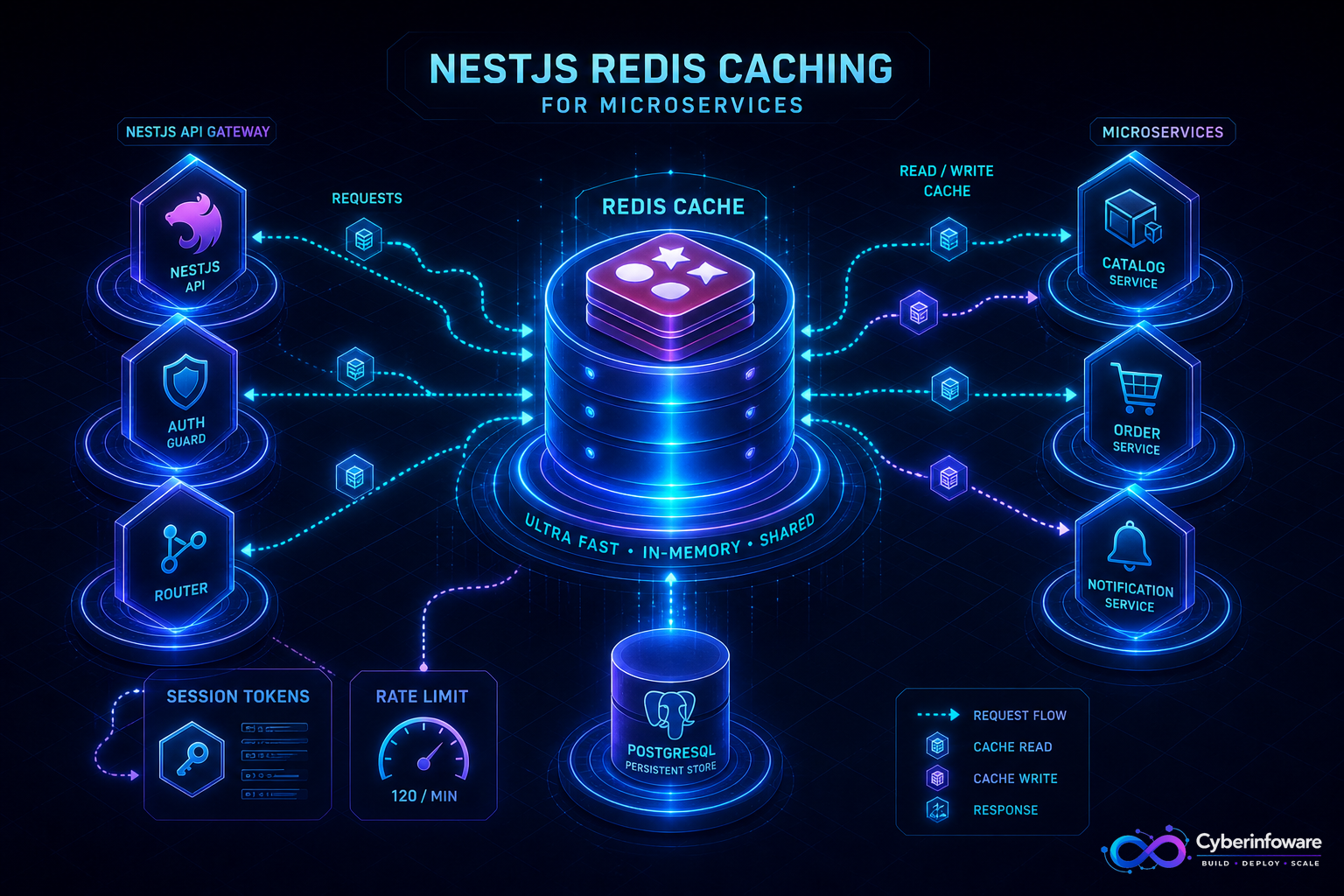
Redis is the difference between an API that feels snappy and one that re-queries PostgreSQL on every tenant lookup, permission check, and product list. In NestJS microservices and multi-tenant SaaS, Redis is not a nice-to-have — it is how you keep gateways fast, sessions sticky, and rate limits honest under load.
This guide covers production caching patterns for NestJS — cache-aside, sessions, rate limiting, and invalidation — and how Cyber Infoware kits ship Redis already wired into the control plane so you extend patterns instead of inventing them.
Where Redis belongs in a NestJS architecture
- API gateway — short-lived auth metadata, rate-limit counters, idempotency keys
- Domain services — hot reads (catalog, plans, feature flags) that change rarely
- Sessions / SSO edge — tokens and session state when you need shared access across instances
- Async workers — locks and dedupe keys so consumers do not double-process events
Pattern 1: Cache-aside (the default that scales)
Read path: check Redis → on miss, load from PostgreSQL → write Redis with a TTL → return. Write path: update the database first, then invalidate (or update) the cache key. Keep TTLs intentional — tenant config might be minutes; a product price list might be seconds during a sale.
- Define stable key shapes: `tenant:{id}:plan`, `catalog:sku:{id}`, `user:{id}:roles`.
- Prefer short TTLs plus explicit invalidation over "cache forever."
- Never treat Redis as the only copy of money, entitlements, or audit data.
- Measure hit rate — a cache nobody hits is just another dependency.
Pattern 2: Rate limiting at the gateway
Distributed NestJS instances need a shared counter. Redis sliding-window or token-bucket limiters at the API gateway protect downstream services from noisy tenants and bot traffic without putting that logic in every microservice.
Pattern 3: Sessions and multi-instance NestJS
Horizontal Pods kill in-memory sessions. Store session or token metadata in Redis (or lean on Keycloak/JWT correctly) so any replica can serve the next request. For SaaS admin consoles and Lattice-style onboarding UIs, shared session strategy is part of "it works in Kubernetes," not an afterthought.
Invalidation without foot-guns
- Invalidate on write for keys you own — do not hope TTL alone is enough for billing state
- Namespace keys by tenant so a flush never becomes a cross-tenant incident
- Use pub/sub or event hooks when multiple services must drop the same logical cache
- Log cache miss storms — they often reveal N+1 query bugs, not Redis problems
SaaS-specific caching tips
- Cache entitlements/plans aggressively; invalidate on subscription change events
- Never cache raw PII longer than policy allows — prefer IDs and derived flags
- Per-tenant databases still benefit from Redis for cross-request hot paths at the gateway
- Pair Redis with RabbitMQ: after `subscription.updated`, consumers invalidate related keys
What "done" looks like
Hot paths hit Redis first; writes invalidate cleanly; rate limits hold under multi-replica load; and Grafana shows cache hit rates next to API latency. That is the bar for NestJS SaaS caching. Explore packages on cyberinfoware.com/products or contact us to match a kit to your performance goals.
Explore Cyber Infoware packages
Production NestJS SaaS foundations with commercial licensing — pick the architecture that matches your team.
- NestJS Microservice Starter Kit
Production NestJS microservices — API gateway, Keycloak SSO, RabbitMQ, Docker, Kubernetes, and Terraform.
- Enterprise SaaS Microservices Boilerplate
Full multi-tenant SaaS control plane as NestJS microservices — service-per-DB, billing, audit, notifications.
- Multi-Tenant SaaS Boilerplate
Best-seller NestJS multi-tenant SaaS boilerplate — one API, per-tenant databases, billing, and Keycloak SSO.